 Overview
Not so hard for a freshman.
Auto diagnosis.
Real time capture.
If it's cheaper, I will definitely buy it!
After using
Colasoft Packet Sniffer, I found 3 features of this product:
1.supports the real-time capturing and monitoring
2.excellent capability of protocol analyzing (approximately 300 types) and packet decoding
3.Well, the most exciting part is the automatic expert diagnosing! That really saves so much money and time for me, and I do not worry about the solution of failure again!
Cost and performance are in desired level .
What It Is and What It Can DoColasoft Packet Sniffer is an expert packet sniffer and protocol analyzer designed for packet decoding and network diagnosis; it monitors the network traffic transmitted over a local host and a local network, with the ability of real time packet capture and accurate data analysis. Colasoft Packet Sniffer makes your network operations completely transparent before you, letting you isolate and troubleshoot network problems quickly and efficiently. The flexible and intuitive user interface lets either IT professionals or novice users skilfully handle it in a few moments.
Easily understand how to use this packet sniffer with samples provided with the Tool. Sample packets helps me a lot for my first time deployment by avoiding contacting the Technical Support during my initial days of using this Tool.
For a Small Business Enterprise, This tool's network diagnosis helps me to detect slow network and upgraded speed for better utilization.
I prefer this for a Medium Business Enterprise as troubleshooting network issues is simply superb.
For Medium and a Large Business Enterprises, Security is an issue.This packet sniffer enhances Network Security by monitoring the network with Logs. As every packet is recorded and analyzed, loopholes can easily detect.
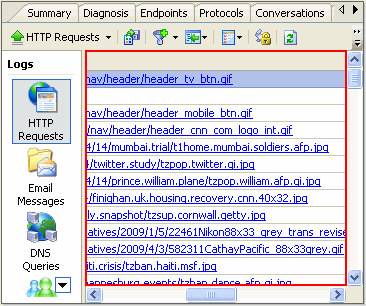
For every organization, security is a major concern. By using this tool Monitoring of Email Contents and Monitoring IMs, Chats is easy. Every information in Messegers, chats, HTTP Requests is logged .
Can easily find where the problem from the Packet Analysis without letting the user to report about his huge traffic.
For Internet Service Provider, this is very very useful tool. ISPs have problems of Server down issues due to huge traffics. By diagnosing with this tool, Server down issues can be reduced.
Prevent hibernation while capturing and view both IP Addresses and Hostnames. This is a good feature in upgraded version.
Colasoft Packet Sniffer Supports Windows Vista-64 bit Edition. Able to identify and Analyze 300+ Network Protocols.
By going through the site
www.colasoft.com, I came to know that Colasoft Packet Sniffer Professional Edition available and used it for Analyses. It really good to use and operate. Everything is logged and my network usage is monitored.
Videos in the website help me to understand the ARP Attacks, Monitoring Network traffic. So I can protect my network now by identifying the deceived hosts and by identifying who is consuming maximum bandwidth in a Local Segment.
I can monitor the traffic either by protocol, IP or MAC Address. So much flexibility in using this packet sniffer.
Internet Service Providers can use this tool for quick issue troubleshooting. Easy to identify problems and minimizes the time to service the customer.
The reports are displayed with Graphs and Tables .Viewing the connection in a matrix is wonderful and it is something special in Colasoft Packet Sniffer. This pictorial representation is really good to sort out the issue by easily detecting.
Colasoft Packet Sniffer has the tools that would not find in other protocol analyzers, including ping and scan IPs and MACS across the LAN.
SummaryColasoft Packet Sniffer is an easy-to-use and all-in-one tool for IT Network Administrator, IT Consultant and for a Security Manager in IT Company.


 Posts
Posts


