Showing posts with label security. Show all posts

Wednesday, June 24, 2009

How to Detect Email Worm with Colasoft Packet Sniffer

What Is an Email Worm
In networking, an email worm is a computer worm which can copy itself to the shared folder in system. And it will keep sending infected emails to stochastic email addresses. In this way, it spreads fast via SMTP mail servers.


What Is the Harm of Email Worm

An email worm can send lots of infected emails in a very short time and it will never stop unless it’s removed. It will cause a large traffic and make the system go slowly. Sometimes it even makes the mail server crash.


How to Detect Email Worm

If you are suspicious some host in your network is infected with an email worm, here is a process how we can detect email worm" in network with Colasoft Packet Sniffer, step by step.


>Step1. Download a free trial and deploy it properly.


>Step2. Launch a Project and Start Capturing Some Traffic.


>Step3. Switch to “Diagnosis” Tab

Diagnosis tab is a view we can see all the network issues automatically detected by Colasoft Packet Sniffer, also some causes and solutions are suggested.
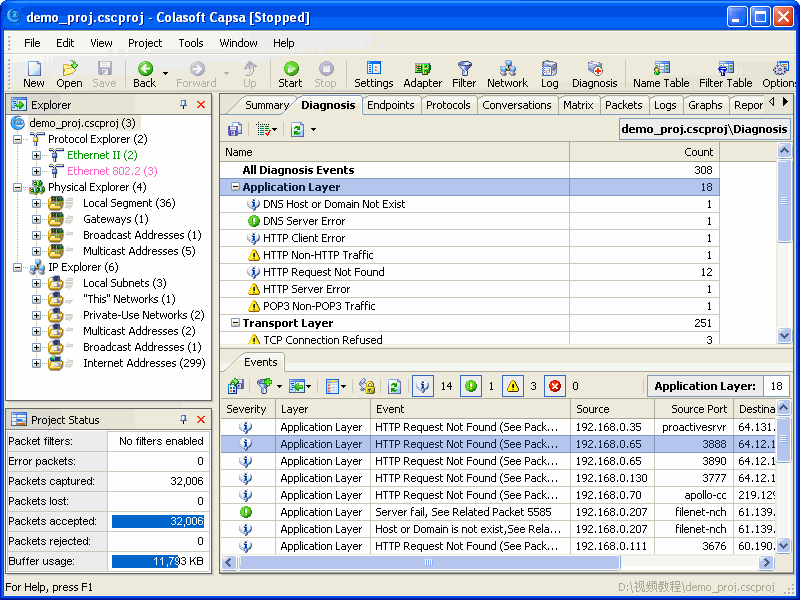

Diagnosis Tab Screenshot


If there is a host infected with an email worm, we should be able to see SMTP events in the application layer like this:
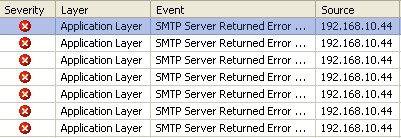

SMTP Events in Application Layer


>Step4. Locate the Source IP

Possibly the source IP is the host infected with an email worm as it is sending too many emails in a short period of time with SMTP. So let’s locate the source IP in the “Explorer” with the “Locate” shortcut in the right-click menu.
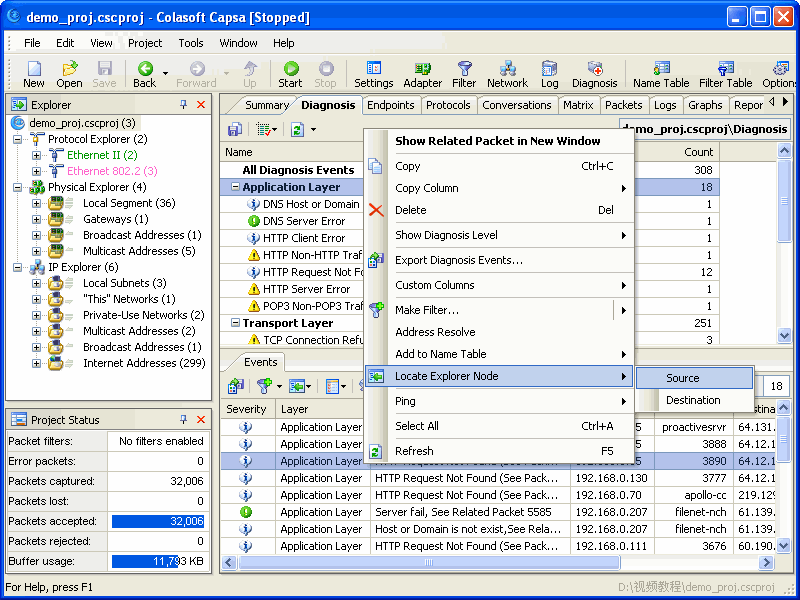

Locate Source IP


>Step5. Switch to “Logs” Tab

Check if the host is sending emails to a large number of recipients in a very short period of time. If so, we can determine the host is infected with an email worm and should be handled immediately. We should be able to see logs in the Tab like this:
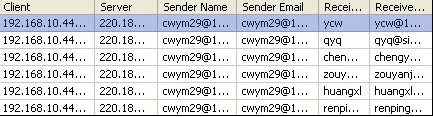

View Email Logs in "Logs" Tab


No doubt the final step is to isolate the host and kill the email worm with some AV software


Also there will be some other process to detect email worm with Colasoft Packet Sniffer, this is the shortest one.


Monday, June 8, 2009

How to Monitor MSN Chat with Free Unipeek MSN Monitor

For some purposes we want to monitor MSN chat around the network, for example, parents want to monitor MSN chat of their kids to ensure their safety; bosses want to monitor MSN chat of employees for company assets security and to improve work efficiency by minimizing none-business chat during working hours. You may still remember Colasoft MSN Monitor, now it is called Unipeek MSN Monitor and it is distributed completely Free for none commercial users.


Now let’s see how we can monitor MSN chat with Unipeek MSN Monitor, the free tool.


Step1. Download Unipeek MSN Monitor


Download Unipeek MSN Monitor, the free edition; from the website. As a matter of fact there is no function difference between Unipeek MSN Monitor the free edition and the commercial edition. The only difference is Unipeek MSN Monitor Free Edition only supports 10 MSN accounts maximum, but quite enough for family users.


Step2. Install and Deploy Unipeek MSN Monitor


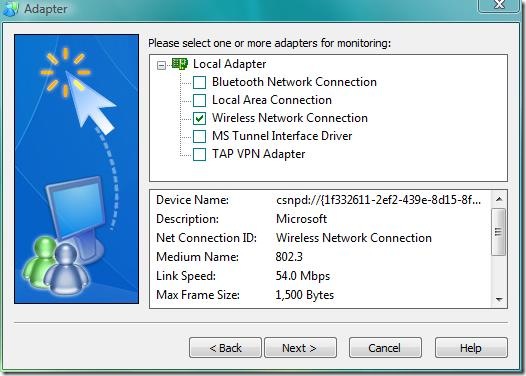
The installation is quick and simple, just click “next” all the way to complete the installation. But the deployment is somewhat different. As Unipeek MSN Monitor is designed based on Colasoft’s packet capturing technology, so it has to be deployed properly like a packet sniffer if you want to monitor all MSN chat around the network. Of course, you don’t have to do it if you only want to monitor MSN chat of a single computer. To monitor multiple computers, you can install multiple copies.


How to Monitor MSN Chat Screenshot 1


Setp3. Run it and Start Monitor MSN Chat


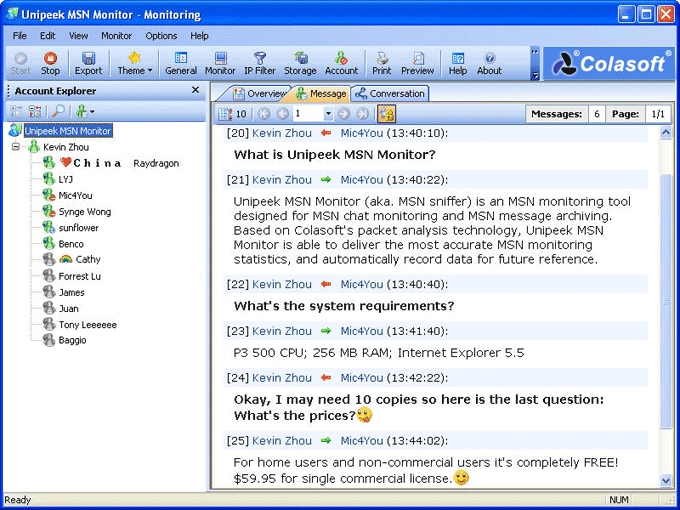
After proper installation and deployment, we can start monitoring MSN chat right away.


How to Monitor MSN Chat Screenshot 2


About Unipeek MSN Monitor
Unipeek MSN Monitor (MSN sniffer) is Free MSN monitoring software for MSN chat monitoring and MSN message archiving. Based on Colasoft's packet analysis technology, Unipeek MSN Monitor is able to deliver the most accurate MSN monitoring statistics, and automatically record data for future reference. You need only install Unipeek MSN Monitor once to monitor all MSN chats over the local network.


Key Features include:

• Real-time and 24/7 MSN chat monitoring

• Automatically archive MSN messages for future reference

• Export messages of a custom time range

• Customize MSN account list to be monitored

• Unique Conversation Matrix showing account relations

• Support emotion icons, message font size and color.


Download Now

Download Unipeek MSN Monitor


Monday, May 11, 2009

Find Out the Top Network Administrator Tools

Packet Sniffers/Network Protocol Analyzer

With packet sniffers and network protocol analyzers, you can monitor network activity, analyze network performance, enhance network security, and troubleshoot network issues.

1, Colasoft Packet Sniffer - http://www.colasoft.com/ Colasoft Capsa performs real-time packet capturing, 24/7 network monitoring, advanced protocol analyzing, in-depth packet decoding, and automatic expert diagnosing. It allows you to get a clear view of the complex network, conduct packet level analysis, and troubleshoot network problems.
2, Ethereal – http://www.ethereal.com/
3, EtterCap – http://ettercap.sourceforge.net/
4, Snort – http://www.snort.org/
5, WinDump / TCPDump - http://www.tcpdump.org/wpcap.html/
6, DSniff – http://naughty.monkey.org/~dugsong/dsniff/

Scanning Tools
1, Nmap – http://www.nmap.org/
Nmap is a port scanner. A port scanner scans for open ports, such as 80 (http) or 25 (SMTP)

2, Sam Spade – www.samspade.org/
Sam Spade is a multi network query tool with many extra built in utilities, even a tool for spam. It includes utilities such as ping, whois, traceroute, and finger

3, NetScanTools Pro ($199) –http://www.netscantools.com/nstmain.html
NetScanTools Pro Edition is an integrated collection of internet information gathering utilities for Windows Vista/2008/2003/XP/2000. Use it to research IP addresses, hostnames, domain names, email addresses, URLs automatically** or with manual tools.

4, SuperScan – http://www.foundstone.com/
SuperScan has the primary purpose of scanning an IP range. It supports extremely fast Host Discovery lookups as well as TCP and UDP port scans thanks to its multi-threaded and asynchronous techniques.

UserManagement - http://www.tools4ever.com/
Complete user account management featuring advanced user creation, modification, removal, mass creation/removal and delegation of administrative tasks. The UserManagemeNT Suite consists of three modules, Professional, Import and Delegation. These modules can operate independently or seamlessly integrated with each other.

AdminMagic - http://www.tools4ever.com/
Full control: Using AdminMagic, you can take over and control users' desktops from your own workstation. Featuring complete mouse and keyboard emulation, you can execute programs, login/logoff, modify device drivers and reboot all from a central location. You can also take screenshots of remote desktops and store/print them for later use. Remote users will not be interrupted and can continue working as they always do.

Advanced System Optimizer - http://www.systweak.com/
Advanced System Optimizer is a system tweaking suite that includes around 30 tools to improve and tweak your PC's performance. It offers an attractive and easy to use interface that organizes all tasks into categories and provides graphical statistics whenever possible. The tools include junk file cleaner, memory optimizer, system information, system files backup, file encryption, safe uninstaller, duplicate file finder, taskbar manager and much more. Advanced System Optimizer also includes an Internet tracks eraser with cookie manager and secure deletion, and even a desktop sticky notes application. Overall, a great bundle that offers a wide range of system tools with extra benefits that are hardly ever found.


Colasoft Capsa is an easy-to-use packet sniffer for network monitoring and troubleshooting. It performs real-time packet capturing, 24/7 network monitoring, advanced protocol analyzing, in-depth packet decoding, and automatic expert diagnosing. By giving you insights into all of your network's operations, Capsa makes it easy to isolate and solve network problems, identify network bottleneck and bandwidth use, and detect network vulnerabilities.
 
Free counter and web stats